How would you like to see Updog?

Either way it’s free, and there’s no sales pitch to sit through.

Live on Zoom

Join What’s Updog?

Thursday, December 3, 1:00 PM Eastern. An hour on Zoom with the Updog team and other loan officers. Ask anything in the Q&A.

Any day

A one-on-one demo

Thirty minutes with someone from Updog, at a time that suits you, about the way you work.

Pick a time

Save my seat opens the sign-up right here. Pick a time opens our calendar in a new tab.

Formerly Tempo

For loan originators who use ARIVE

What’s Updog?

Not much. What’s up with you? Updog is the sales operating system for loan originators who use ARIVE. It brings in your loans, leads and contacts from ARIVE, and each morning starts with a list of who to call.

Free for 7 days. Then $149 a month. See pricing

Updog is built solely for ARIVE users. You’ll need your ARIVE keys to set it up.

LendingPad users, .

Join the LendingPad waitlist

Updog works with ARIVE today. Leave your name and email, and we’ll email you when you can use Updog with LendingPad.

We’ll email you twice: now, to say you’re on the list, and when Updog works with LendingPad. Each email has a link to take you off the list.

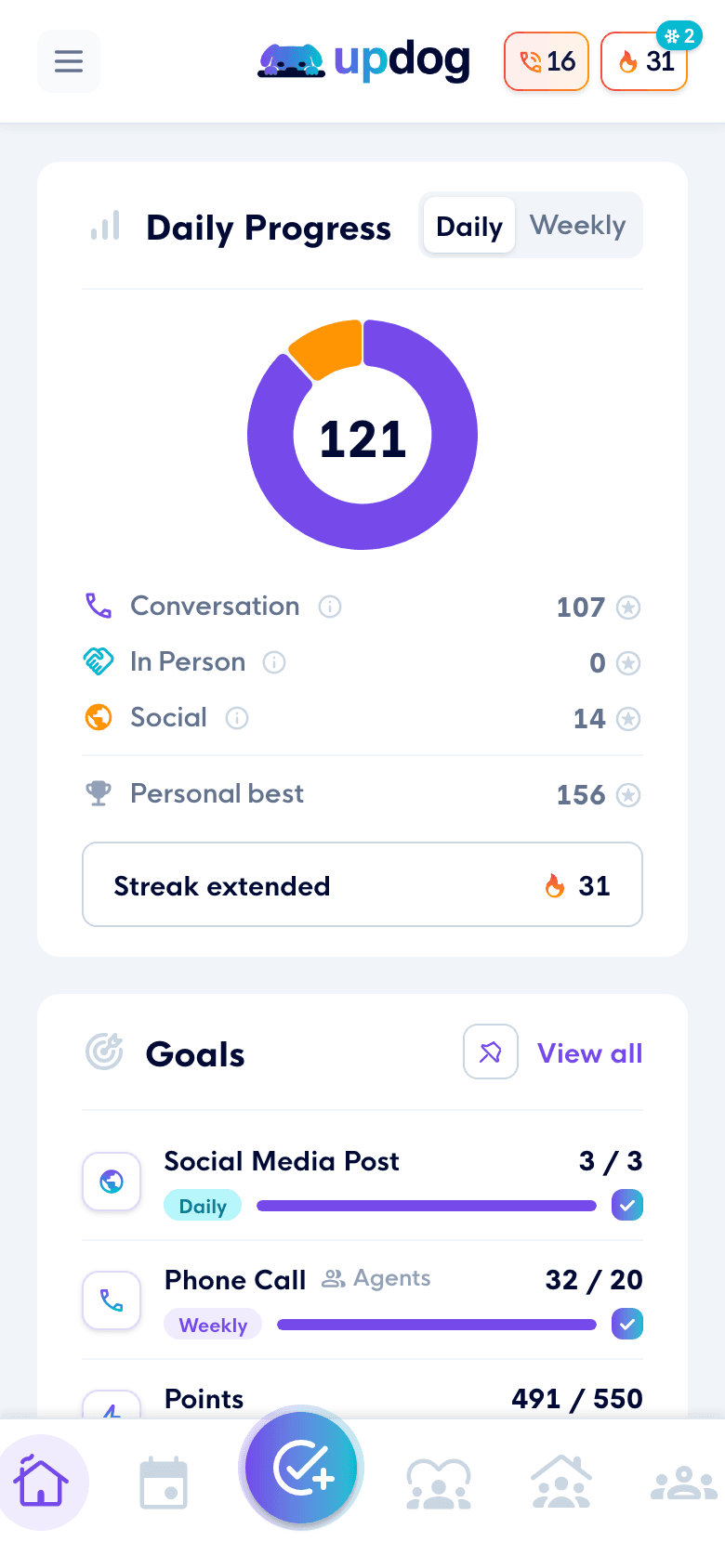
updog — home
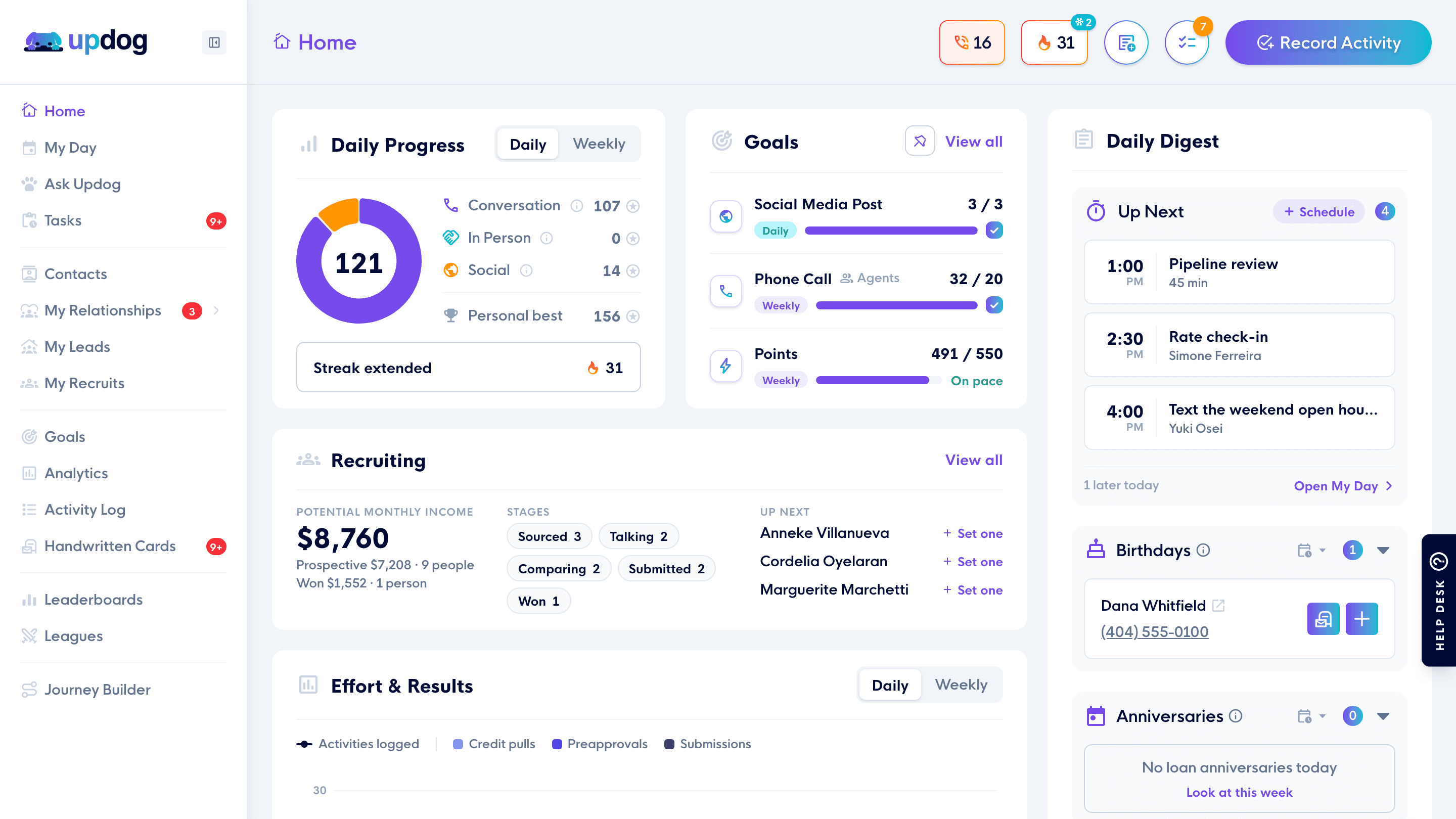
The Updog home page on a phone: the daily progress ring with the streak, goals with their progress bars, and the tab bar with the record button.

Your CRM can finally send blue bubble texts from your number.

DogBot is Updog’s app for the Mac. Install it on a Mac that stays on, like a Mac mini in your office, and it sends your texts through Messages. Your clients get an ordinary text from you.

Built for ARIVEStart free trial
dogbot — sending from (512) 555-0142
  1. 1You write one text in Updog Send and choose who gets it.
  2. 2DogBot sends each person their own text from your number, with their own name in it.
  3. 3When Maria’s loan is clear to close, DogBot texts her the loan status update.
  4. 4Maria writes back, and DogBot copies her reply into Updog.
  • Every text from Updog goes out from your number.

    A text can come from a journey, a loan status update, your partner updates, Updog Send or the Text button on a contact. DogBot sends each one through Messages.

  • One text can go to 20 people at once.

    Write it once in Updog Send and choose who gets it. Updog puts each person’s first name where you typed {first_name}.

  • Your phone can send your texts instead.

    Without a Mac connected, each text waits on your phone and you send it with one tap.

  • DogBot can copy your texts into Updog.

    When copying is on, the texts you trade with your contacts in Messages show up in Updog too, so each contact’s history is in one place.

  • Automatic texts wait for daytime.

    Updog holds automatic texts to the daytime hours each state allows where the client lives. It sends one person no more than three automatic texts a day, and it stops texting anyone who replies STOP.

  • DogBot comes with Updog.

    It’s included in Updog’s $149 a month. You download it from Updog’s settings onto a Mac of your own.

Updog connects to the tools you already use.

See what each one does
  • ARIVE
  • RETR
  • PhoneBurner
  • Google
  • Microsoft
  • Facebook
  • Zapier
  • Handwrytten
  • Claude
  • ChatGPT
  • Gemini
  • Grok
Every Thursday

What’s Updog? Live on Zoom.

Next one Thursday, December 3, 1:00 PM Eastern. Free, an hour, with your questions answered.

Save my seat
what_it_does

What it does

Updog tracks the daily work that turns into loans and shows you how you’re doing against your goals.

Activities and streaks

Log calls, meetings and follow-ups in a couple of taps, and workouts too: a run, a lift or a round of pickleball counts toward your day. Each business day you hit your goal adds to your streak, and a banked freeze covers a day you miss.

My Day

Today’s follow-ups and tasks on one screen. A Your Day email brings yesterday’s numbers and today’s plan before you open the app. It shows your Google Calendar too, with invites and Meet links.

Lead Tracker

Every lead with its stage and next step, so none of them go quiet without you noticing. Your ARIVE leads sync in and turn into loans.

Relationship Tracker

Your referral partners and past clients, with when you last talked and when the next touch is due.

Goals and Activity Log

Set weekly targets for calls, posts or points. The log fills in as you work, so you always know how far you have to go.

Notes

Keep notes on every contact and conversation, and find them on the contact the next time you call. Updog summarizes each contact’s notes before you open them.

Ask Updog

Ask about your pipeline in plain English and get answers from your own data. It can make changes for you, too.

Contact upload

Bring your contacts in from a spreadsheet and start working them the same day. There’s no upload limit.

Miss a day. Keep the streak.

Every ten days you hit your goal, Updog banks a streak freeze, up to fifteen. If you miss a business day, a freeze covers it, so a sick day or a busy closing day doesn’t break your streak.

streak_freeze — day 3 of 5

Updog is on your iPhone

The app has everything Updog has on the web. Sign in with your Updog email and password.

  • It reminds you before your streak ends

    If you’re short of the points that keep your streak going, the app tells you how many you need at 5:00 PM. You can change the time or turn the reminder off.

  • It asks how the call went

    Call someone from Updog, and when you hang up and come back, the app asks how it went. One tap logs the call and its points.

  • You choose what it tells you

    Loan milestones, new leads, Power Hour invites and the other notifications each have their own switch. You can also lock the app with Face ID.

Download on the App Store

There’s no Android app yet.

9:41

How did it go?

Texts from your own number

Updog sends your texts through Messages, from the number your clients already have saved. On an iPhone they come in as iMessages from you, the same as a text you typed yourself.

  • In your journeys and loan updates

    Add a text to a journey, a loan status update or your partner updates. When you turn a journey on, Updog shows you each text before any of them go, and every text waits until it’s daytime where the person lives.

  • A Mac in your office sends them

    Connect a Mac that stays on, and Updog for Mac sends each text through Messages. Without a Mac, each text waits on your phone, and one tap sends it. Android phones get your texts as regular texts while your iPhone is on.

  • Text up to twenty people at once

    Tick the contacts, write one text with each person’s first name in it, and your Mac sends them one at a time from your number.

  • Your texts stay with your contacts

    Turn on copying, and each contact’s Texts tab shows your conversation with them. With copying on, anyone who replies STOP isn’t texted again.

Start free trial

Marcus Reyes

  1. Tuesday 9:14 AMDana: Hi Marcus, it’s Dana. Your appraisal came back right where we needed it.
  2. Marcus: Love it, thanks Dana
  3. Today 10:02 AMDana: Marcus, you’re clear to close! I’ll call you this afternoon.Delivered
  4. Marcus: No way!! Thank you 🙏

Updog sent both blue texts from Dana’s Mac.

Power hours. Leaderboards. Leagues.

Cold calling is easier when your team is doing it with you, even if they work in another state.

  • Power hours

    An hour of calls with your team, on a live board that updates as everyone dials.

  • Leaderboards

    See where you rank against the team by activity, today and this week.

  • Leagues

    Teams compete over a season, where a strong week counts for more than one big day.

  • Prizes

    Some leagues Updog runs come with merch prizes. Finish on the podium, choose your size and tell us where to send it, and we print it and ship it to your door.

power_hour — 42:10 left
  1. 1JR

    Jordan R.

    31

    North
  2. 2AM

    Alex M.

    27

    North
  3. 3SP

    Sam P.

    24

    Coastal
  4. 4TK

    Taylor K.

    19

    Coastal
  5. 5CL

    Casey L.

    16

    North

You won the Updog Tee for 1st in Fall Sprint.

Choose your size and where to send it.

branch — northside · this month
LOActivityPulls
  1. JR

    Jordan R.

    1429

    RisingBranch pays

  2. AM

    Alex M.

    1181

    Busy, not convertingBranch pays

  3. SP

    Sam P.

    966

    Pays for themselves

  4. TK

    Taylor K.

    543

    Behind paceBranch pays

  5. CL

    Casey L.

    122

    Gone quietPays for themselves

“Who’s gone quiet this week?”

“How is Sam converting next to the branch?”

“Who leads Northside on fundings this month?”

For branches

Run your branch on Updog.

See who’s working and who’s gone quiet, pay for your LOs’ accounts, and put everyone in the branch on one leaderboard.

  • See who needs a look

    Branch lists the LOs to check on first. That’s anyone who hasn’t logged anything, has gone quiet, is behind their pace, or is busy without converting. Anyone well ahead of their usual pace is listed too.

  • Invite LOs and pay for them

    Invite by email and choose whether the branch pays for them. It’s one monthly bill on the branch’s own card, and an LO who was paying for themselves gets the unused part back as credit.

  • One leaderboard for the branch

    The branch leaderboard ranks everyone in the branch on activity and on credit pulls, locks, fundings and volume.

  • The whole company, for its leaders

    Company leaders see every LO in the company, all together or one branch at a time. The company can pay for its LOs on one bill, or leave a branch to pay for its own. Or split the bill: pay half of each LO’s plan, or any share you choose, and they pay the rest. Everyone shares a company leaderboard. With ARIVE connected, leaders can set up the branches themselves. Updog finds the company’s offices in ARIVE and puts each LO in the one where most of their loans are, and leaders can move people and rename branches whenever they need to.

Email Campaigns

Write an email in Updog, choose who gets it and schedule it. It goes out under your name and signature, and replies come to your inbox.

  • Broadcasts and sequences

    Send one email to a list, or set up a sequence of up to ten emails spaced out over weeks. New contacts start at step one on their own.

  • Built from blocks

    Put it together from headings, text, images and buttons, and it looks right on a phone without extra work. If you already have a design, paste in its HTML.

  • Check it before it sends

    The review step shows who will get it, who won’t and why. Send yourself a test before you confirm.

campaigns — new broadcast
  1. Basics
  2. Recipients
  3. Message
  4. Schedule
  5. Review
From
Jordan Reyes
Subject
We moved.
Preview
Same team, same number, new address.
text

Hi Dana,

heading

We moved.

text

Same team, same number, new address below. Come by. There is coffee.

buttonGet directions
divider

Jordan Reyes · NMLS 123456 · 12 Main St, Marietta, GA · Unsubscribe · Preferences

managed_marketing — 8 of 10 on
Enrolled612 of 1,000
Pause all
  • On

    Agent Market Update

    Agents · Mon, Sep 21

  • On

    Borrower Market Update

    Borrowers · Wed, Sep 23

  • On

    Weekend Warrior

    Agents · Fri, Sep 25

  • Off

    Past Client Opportunities

    Borrowers · Off

  • On

    Holiday Email — Borrowers

    Borrowers · Veterans Day

  • On

    Holiday Email — Real Estate Agents

    Agents · Veterans Day

  • On

    Happy Birthday

    Borrowers · 3 this week

  • On

    Loan Anniversary

    Borrowers · 2 this month

  • On

    First Payment Reminder

    Borrowers · 11 days before it is due

  • Off

    Google Business Reviews

    Borrowers · Add your review link

+$49 a month

Soon

Or let us write it.

Managed Marketing is ten email programs that Updog writes and schedules for you, sent under your name: a market update for agents every Monday, a note on each client’s birthday, a review request after funding and more. Turn on the ones you want.

  • Written by a human

    Zero AI used. Our copywriter is waging a personal, one man war against the robots one mortgage marketing email at a time.

  • Sent as you

    Your name and signature are on every email, and replies come straight to your inbox.

  • You choose what goes out

    See each email in your brand before it goes out, and skip any you’d rather not send. Turn programs on and off one at a time, leave out a holiday or a contact, or pause everything at once.

inbox

Email your contacts are glad to get.

Updog handles the sending rules, so your emails get read and you can focus on what to say.

  • Nobody hears from you too often

    Each contact gets at most one routine email a day and three a week across all your campaigns. When two are due the same day, the birthday email goes before the market update.

  • Stays out of the spam folder

    Updog sends only to contacts who agreed to hear from you, and every email has a one-click unsubscribe. Both help keep your email out of spam folders.

  • See what people opened

    Each campaign shows deliveries, opens and clicks. Opens from spam scanners are filtered out, so the numbers are about people.

  • Enroll contacts as you import them

    Upload a spreadsheet and choose the campaigns in the same step, so new contacts are enrolled the moment they’re imported.

Updog includes 2,500 custom sends a month. Managed Marketing is $49 a month on top of your plan, or $30 when you add it at sign-up, with 1,000 enrolled contacts and 10,000 sends a period. No overage charges and no rollover. If you reach a limit, Updog holds the rest and tells you.

Your brand, set up for you

Give Updog your website and it finds your logo, colours and details, then puts them on every email, card and page you send in your name.

  • Start from your website

    Paste your web address. Updog reads the site and finds your logo, colours, typeface and contact details.

  • Pick the look you like

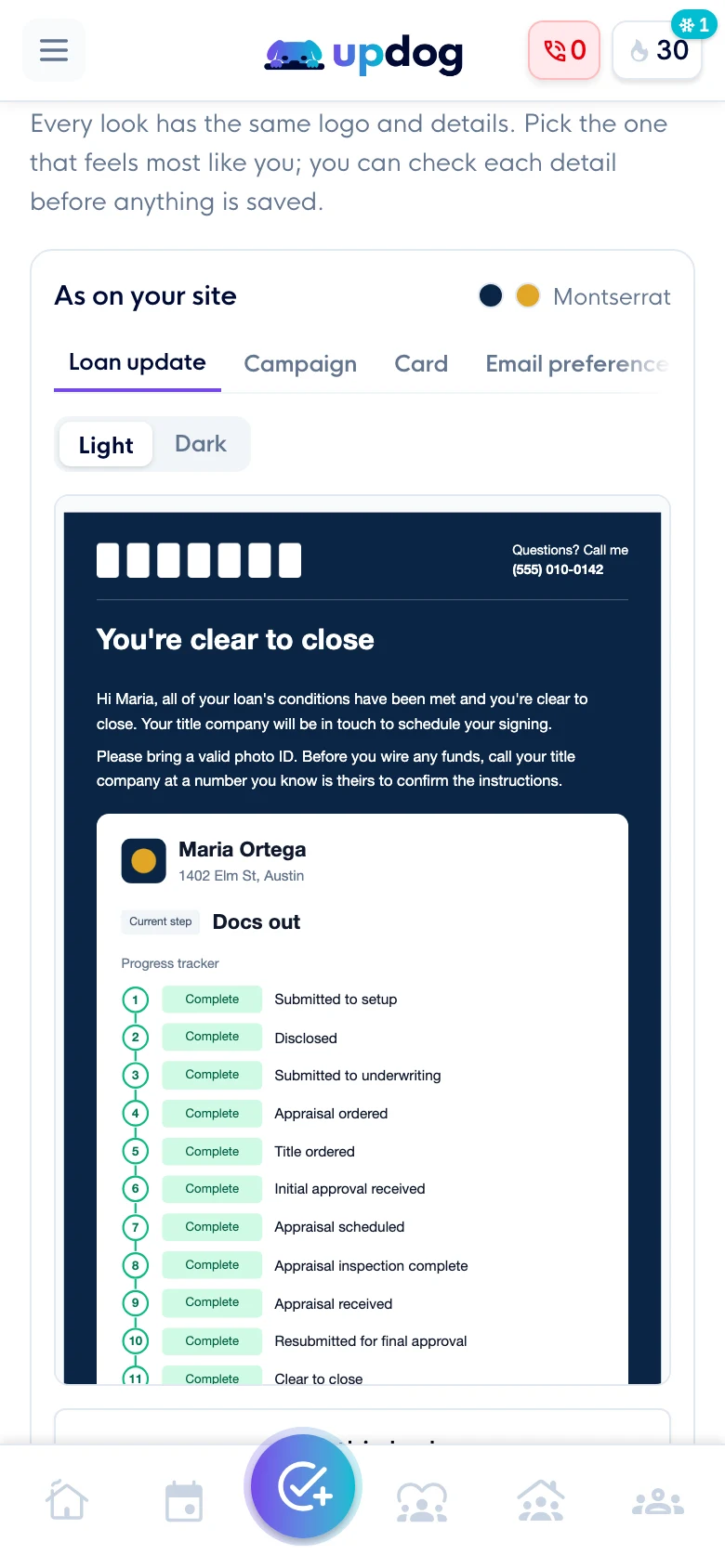
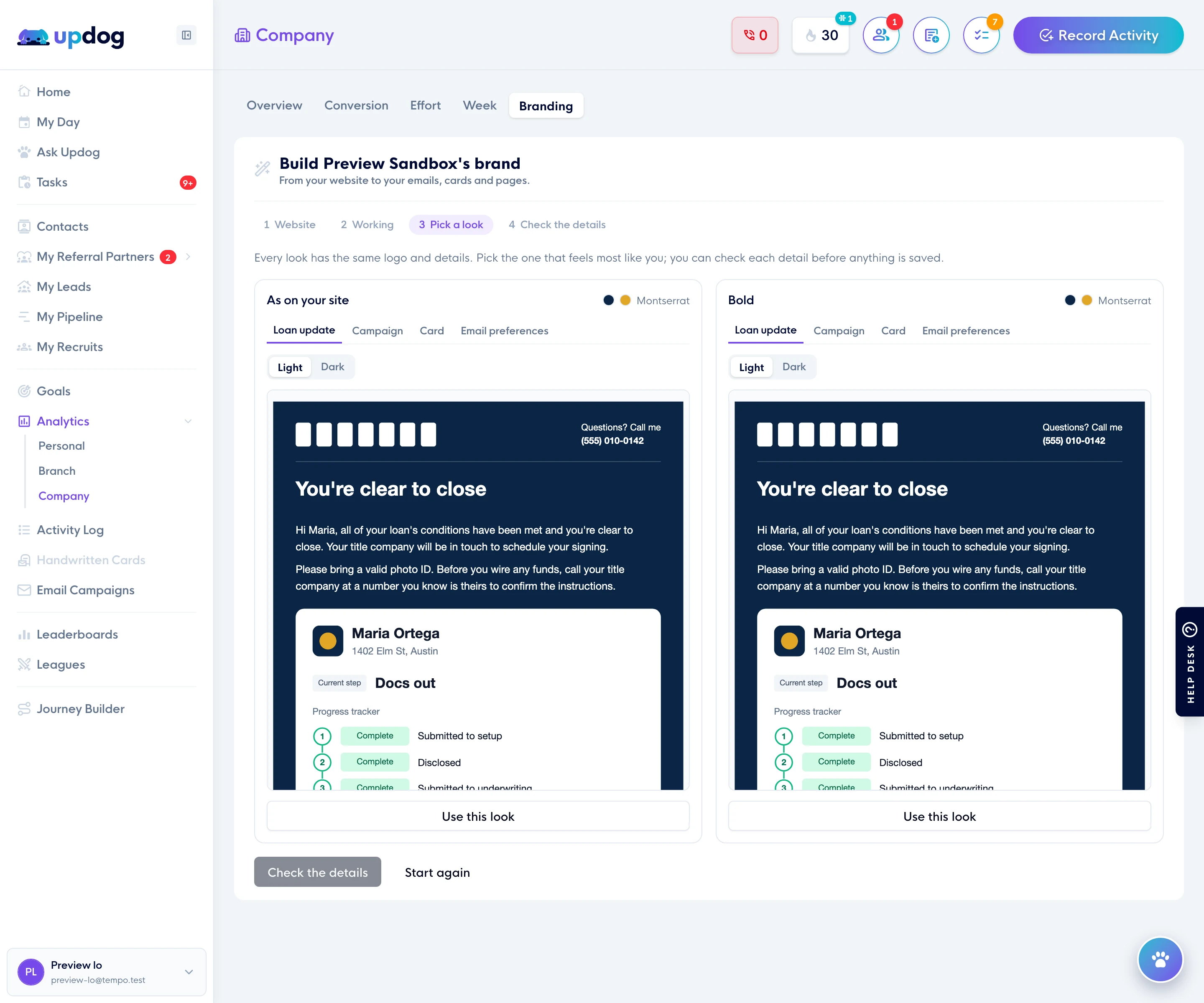
    You choose from the looks it makes, each drawn on a real email. Every look has the same logo and details, and you can check each detail before anything is saved.

  • It shows up everywhere you send

    Loan status updates, campaigns, handwritten cards and the pages your clients open all use it, with your name on them.

  • Change it any time

    Fix a detail by hand, or build again from the site. A branch can follow the company’s look or keep its own.

company — build your brand
Updog’s Pick a look step on a phone: a look drawn on a borrower’s loan status email, with a Use this look button.

Landing pages in your name

Pick a page, change a few words and publish it on your own web address. Everyone who answers it comes into Updog as a lead.

  • Twenty-four pages, already written

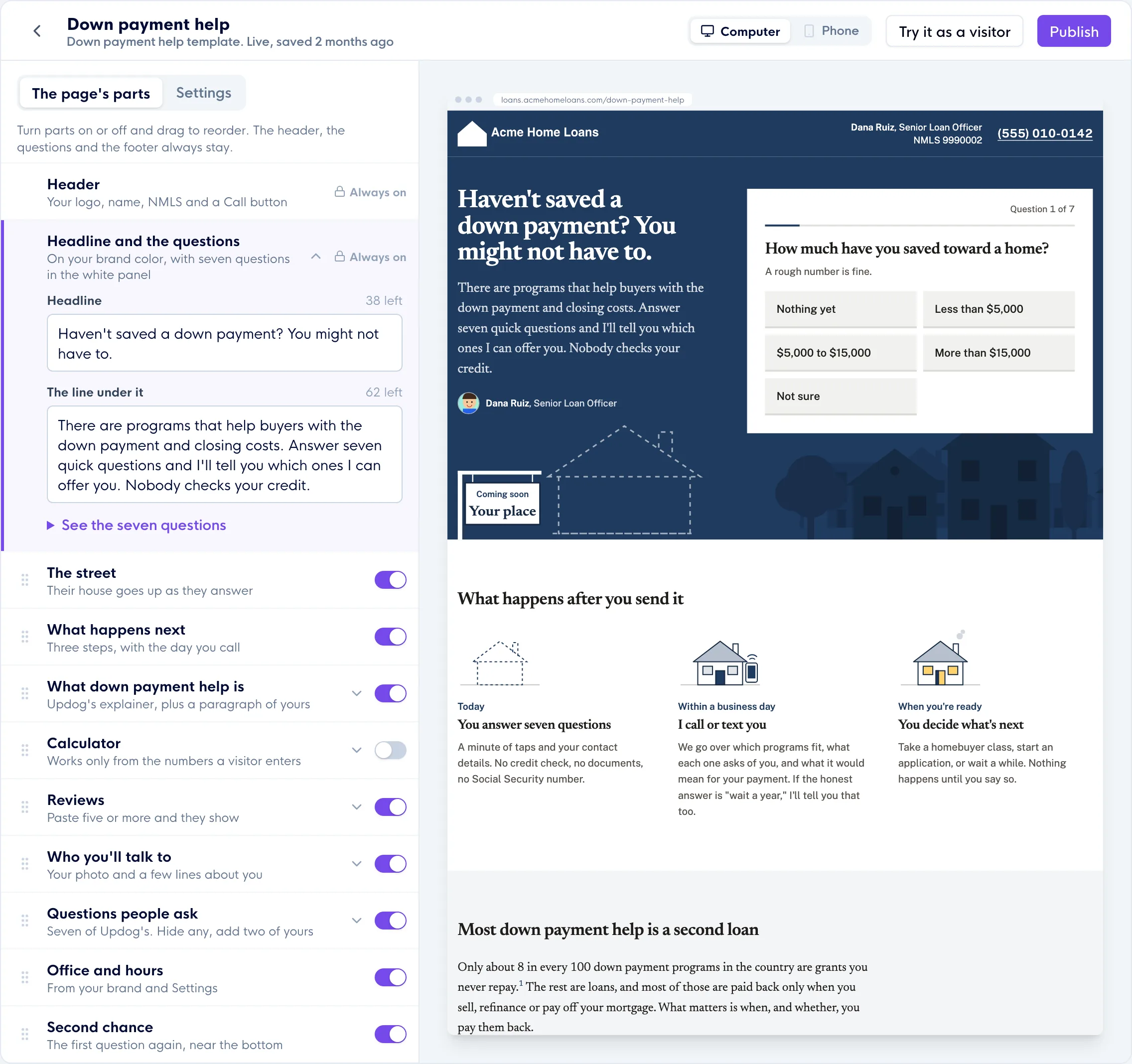
    Down payment help, first-time buyers, HELOC, self-employed, DSCR, ITIN, eight calculators and more, in English or Spanish. Each one comes in your brand.

  • On your own web address

    Connect a domain you own, like loans.yourname.com. Your pages live there, and the QR codes you print open them.

  • Every answer comes into Updog

    Each person who sends a page becomes a contact and a lead with their answers, and can go to ARIVE too. Updog emails you the moment they send it.

  • See what each page brings in

    Visits, leads, applications and funded loans for every page, by ad and QR code, counted without cookies.

  • Compliant from the start

    Every template is written to the mortgage advertising rules. Your NMLS, your company’s licenses and each state’s notice go in the footer, and Publish checks the page before it goes live.

landing pages — down payment help
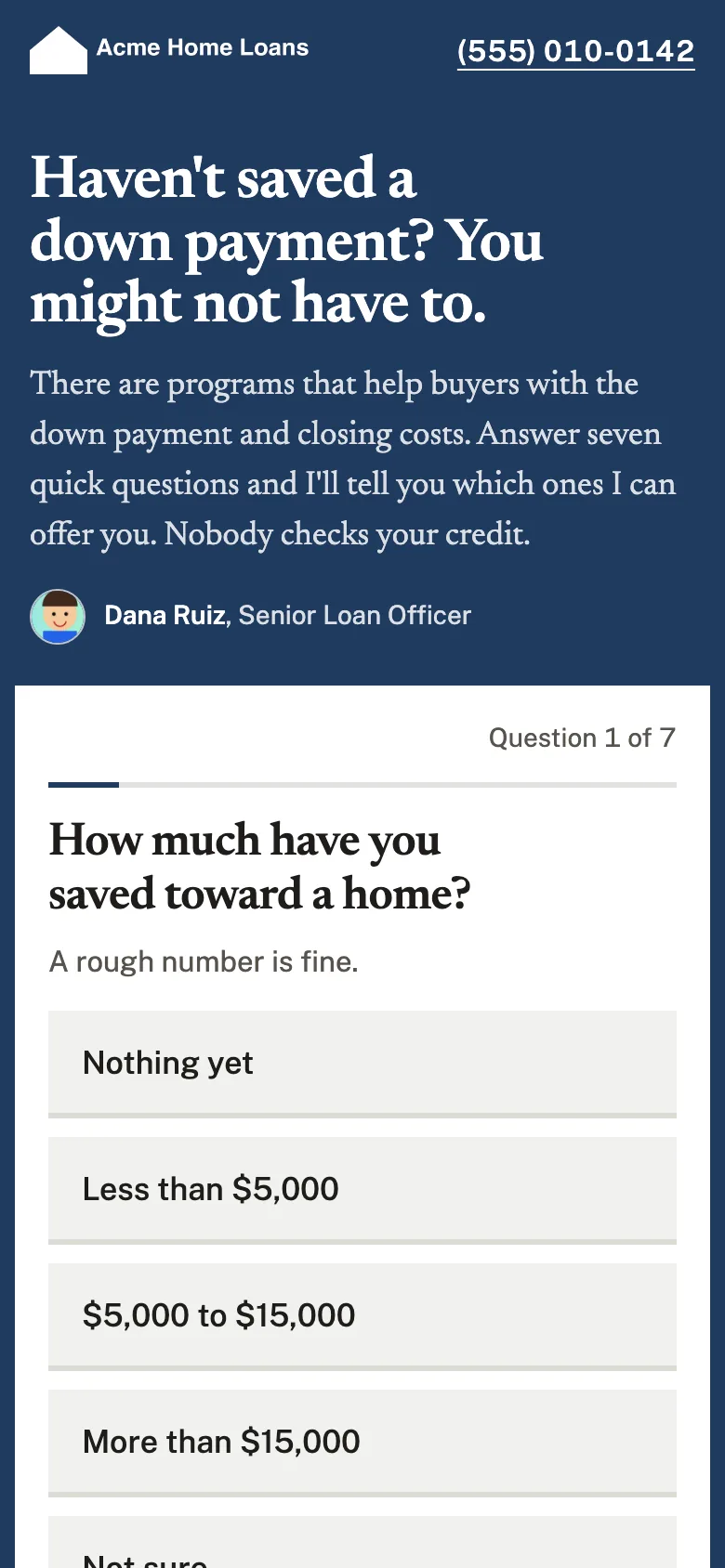
A Down payment help page on a phone, in the loan officer’s brand, asking How much have you saved toward a home?
integrations

Works with the tools you already use.

Connect them once and stop typing the same details twice.

  • ARIVE

    Updog needs ARIVE. Connect it yourself with your ARIVE keys, Direct API Integration or Zapier. Your loans and contacts sync every few minutes, and your ARIVE leads come into Lead Tracker.

  • Zapier

    Connect Updog to thousands of apps with Zapier. Leads from Facebook Lead Ads come in on their own, and funded loans can go to Mailchimp, Google Sheets or Slack.

  • Google Calendar and Outlook

    See your Google or Outlook meetings next to your tasks in My Day, and send invites with a Meet or Teams link from Updog.

  • RETR

    Bring agents in from RETR with their production numbers instead of retyping them.

    Sign up for RETR
  • PhoneBurner

    Every call you make in PhoneBurner is logged on the contact you called and counts toward your streak. Start a dial session from a Call Block, a Power Hour or your contacts.

    Sign up for PhoneBurner
  • Handwrytten

    Send a card handwritten in real ink from a contact’s record. Your first three are free, then $4.95 each.

  • iMessage

    Text a whole list from Updog as iMessage, from your own number. Needs a Mac or an iPhone.

  • Email campaigns

    Write your own broadcasts and sequences, or add Managed Marketing for $49 a month and let Updog write them.

Ask from ChatGPT, Claude, or anything that speaks MCP.

Connect ChatGPT or Claude to Updog and ask about a contact or log a call without leaving the chat.

ChatGPT plugin Claude connector Remote MCP
  • Works in the assistant you already use

    Pull up a contact’s history, plan a call block, prep for a meeting or log a call from the chat you already have open.

  • Signed in as you

    You connect with your Updog login, and the assistant can see only your data.

  • Asks before it changes anything

    It reads your data right away. Before it changes a record, it shows you the change and waits for your OK.

See pricing
assistants — mcp
ChatGPT
Claude
MCP

Your assistant

ChatGPT · Claude · any MCP client

Your Updog data

Contacts, call blocks, activities, notes, pipeline, partners.

“What’s my call block today?”

“Prep me for my next partner meeting.”

“Log that Omar and I talked about the Braves.”

One price for all of Updog.

Every account starts with a 7-day free trial. There’s no sales call and no annual contract.

Updog

Everything you need to log your activity, hit your goals and keep your streak, plus AI, the integrations and competing with your team.

$149/ month

You can always add it later for $49 a month.

Start free trial

Free for 7 days, then $149 a month.

Schedule a demo

Down to $111.75 a month each when 31 or more LOs at your company use Updog.

Your day

  • Activities and streaks
  • Streak freezes
  • Goals
  • My Day, with Google Calendar
  • Activity Log
  • Notes, with AI summaries

Your pipeline

  • Lead Tracker, with ARIVE leads
  • Relationship Tracker Enhanced
  • ARIVE sync every few minutes
  • RETR integration, with contact detail sync
  • Unlimited contact upload
  • Advanced Analytics

Keeping in touch

  • Email campaigns: broadcasts and sequences
  • Custom Journey Builder
  • Bulk iMessage
  • Handwrytten integration, first 3 cards free

AI and your team

  • Ask Updog
  • ChatGPT, Claude, and MCP access
  • Updog Social: power hours, leaderboards, leagues
  • Priority support tickets
  • Dark mode, with three looks

Managed Marketing

+$49 / month

Ten email programs that Updog writes and schedules for you, sent under your name. Start with it and it’s $30 a month.

Invite your LOA

+$49 / month

Your loan officer assistant gets their own login to work in your account, and they don’t pay for Updog. Covers two people.

The more LOs at your company use Updog, the less each of you pays.

It moves on its own as coworkers join, and seats your company pays for count too.

  • 1 LOFull price

    $149

  • 2+ LOs5% off

    $141.55

  • 6+ LOs10% off

    $134.10

  • 11+ LOs15% off

    $126.65

  • 21+ LOs20% off

    $119.20

  • 31+ LOs25% off

    $111.75

Prices in USD, billed monthly. Handwrytten cards after the first 3 are $4.95 each.

Try Updog free for 7 days.

You get all of Updog for the first 7 days, and you won’t be charged if you cancel before they’re up. Updog is built solely for ARIVE users, so have your ARIVE keys ready. Questions about pricing, teams or connecting ARIVE? Schedule a demo, or send them over and someone on our team will answer.